

Serverless architectures have become increasingly popular in recent years, allowing businesses to focus on developing applications without worrying about underlying infrastructure. This shift towards serverless computing has been driven by the need for greater scalability, flexibility, and cost savings. Two of the leading cloud service providers, AWS (Amazon Web Services) and Microsoft Azure, offer serverless computing capabilities through their respective services, AWS Lambda and Azure Functions. In this article, we'll delve into a comparison of these two services, exploring their features, benefits, and cost savings.
What are Serverless Architectures?
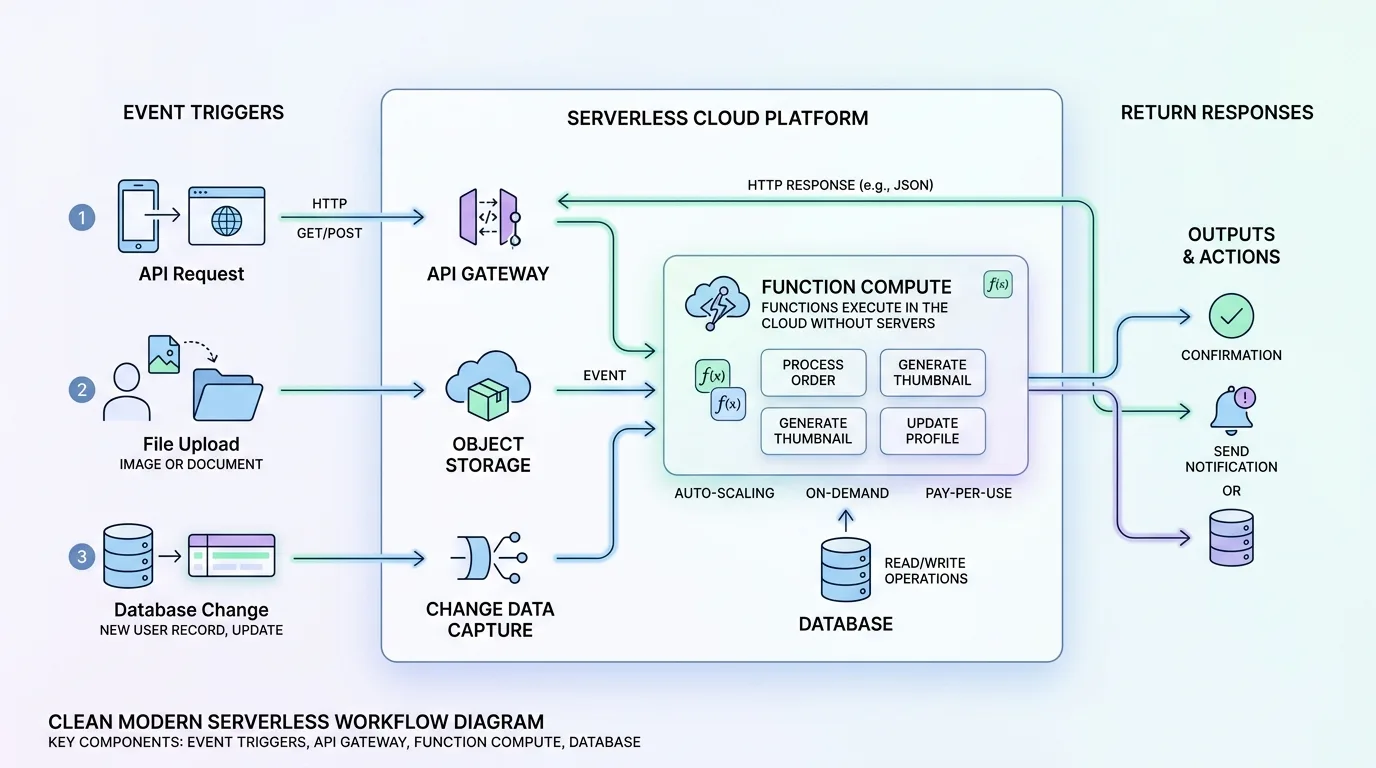
Serverless architectures are a type of cloud computing model where the provider manages the infrastructure, and developers only pay for the resources consumed by their applications. This approach allows for greater scalability, flexibility, and cost savings compared to traditional server-based models. Imagine developing an application without worrying about provisioning servers, configuring network settings, or managing database storage. With serverless architectures, you can focus on writing code and delivering business value, while the cloud provider handles the underlying infrastructure.
In a serverless architecture, applications are composed of functions that are triggered by specific events, such as API calls, changes in data storage, or messages from other services. These functions are typically short-lived and run only when needed, making them ideal for handling tasks like image processing, data integration, or real-time analytics.
AWS Lambda vs Azure Functions: Key Features
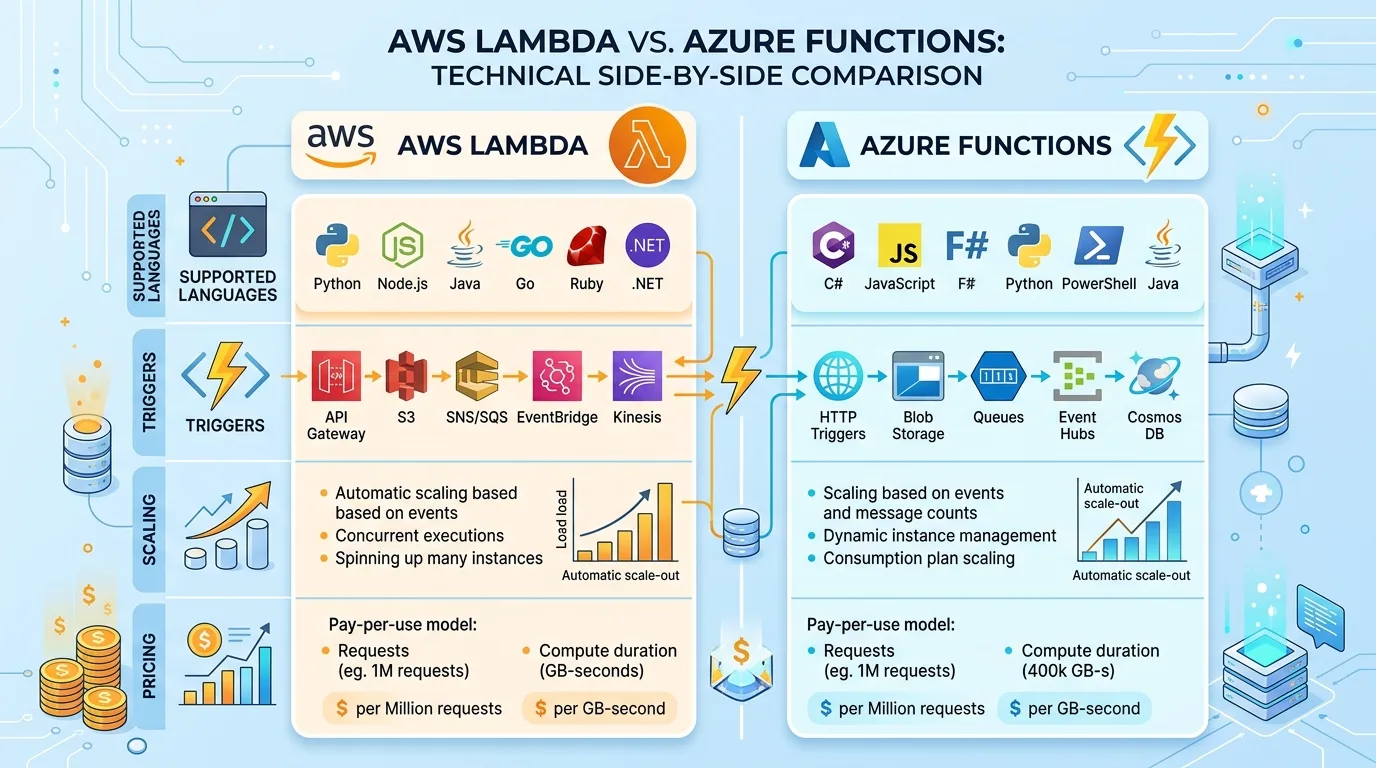
AWS Lambda
+ Supports Node.js, Python, Go, Java, C#, and Ruby
+ Can be triggered by various events, such as API calls or changes in S3 buckets
+ Provides automatic scaling and resource allocation
+ Offers a free tier for 1 million invocations per month
Azure Functions
+ Supports Node.js, C#, F#, Python, Java, and TypeScript
+ Can be triggered by events from Azure services, such as Blob Storage or Event Grid
+ Provides automatic scaling and resource allocation
+ Offers a free tier for 1 million executions per month
When choosing between AWS Lambda and Azure Functions, it's essential to consider the programming languages supported by each service. If your development team is already familiar with Node.js or Python, you may prefer AWS Lambda. However, if your team uses C# or F#, Azure Functions might be a better fit.
Cost Savings: A Comparison
One of the primary benefits of serverless architectures is cost savings. Both AWS Lambda and Azure Functions offer pay-as-you-go pricing models, where developers only pay for the resources consumed by their applications. This approach eliminates the need for upfront infrastructure investments and reduces waste caused by idle servers or underutilized resources.
To illustrate this concept, consider a web application that experiences sudden spikes in traffic during holiday seasons. With traditional server-based models, you would need to provision additional servers to handle the increased load, which can be costly and time-consuming. In contrast, AWS Lambda and Azure Functions provide automatic scaling, allowing your application to seamlessly adapt to changing demands without sacrificing performance or incurring unnecessary expenses.
AWS Lambda Pricing
+ Free tier: $0 (1 million invocations per month)
+ Production instances: $0.000004 per invocation
+ Reserved instances: 10% discount on production instances
Azure Functions Pricing
+ Free tier: $0 (1 million executions per month)
+ Basic plan: $0.000005 per execution (first 400,000 executions per day)
+ Standard plan: $0.000010 per execution
When evaluating the pricing models of AWS Lambda and Azure Functions, consider the cost savings offered by each service. While both services provide free tiers for a specified number of invocations or executions, the production instance prices differ significantly.
Scalability and Performance
Both AWS Lambda and Azure Functions provide automatic scaling and resource allocation, ensuring that applications can handle increased traffic without sacrificing performance. This feature is particularly useful in scenarios where sudden spikes in demand occur, such as during holiday seasons or product launches.
To ensure optimal performance, consider the following best practices:
1. Monitor your application's usage patterns to anticipate scalability needs.
2. Use AWS Lambda's or Azure Functions' built-in auto-scaling features.
3. Configure custom scaling policies based on specific requirements.
Integration and Security
Both services provide robust integration capabilities with other cloud services, as well as security features to protect applications.
AWS Lambda Integration
+ Supports integration with AWS services, such as API Gateway and S3 + Provides IAM (Identity and Access Management) for secure access control
Azure Functions Integration
+ Supports integration with Azure services, such as Blob Storage and Event Grid
+ Provides Azure Active Directory (AAD) for secure access control
When integrating your application with other cloud services, consider the following:
1. Ensure that the chosen service supports the required level of security and access control.
2. Use built-in features like IAM or AAD to manage identities and permissions.
3. Monitor integration performance and adjust as needed.
Conclusion
In conclusion, both AWS Lambda and Azure Functions offer robust serverless computing capabilities, providing businesses with greater scalability, flexibility, and cost savings. While both services share similar features and benefits, there are key differences in their pricing models and integration capabilities.
When choosing between these two services, consider the following:
Cost Savings: Evaluate the free tiers and production instance prices to determine which service offers better value for your business.
Integration Requirements: Assess the level of security, access control, and integration needed by your application.
Programming Language Support: Ensure that the chosen service supports the required programming languages.
By carefully evaluating these factors, you can select the best serverless computing platform for your organization's specific needs.
This Article was made with AI assistance and human editing.


