

Streamlining Project Timelines with GitHub Copilot and AI
As technology continues to advance at an unprecedented pace, professionals across various industries are looking for ways to incorporate Artificial Intelligence (AI) into their workflows. One area where AI is making a significant impact is in software development, particularly when it comes to accelerating project timelines. In this article, we'll explore how GitHub Copilot and other AI-powered code assistants can help developers streamline their projects and deliver results more efficiently.
What are AI-Powered Code Assistants?
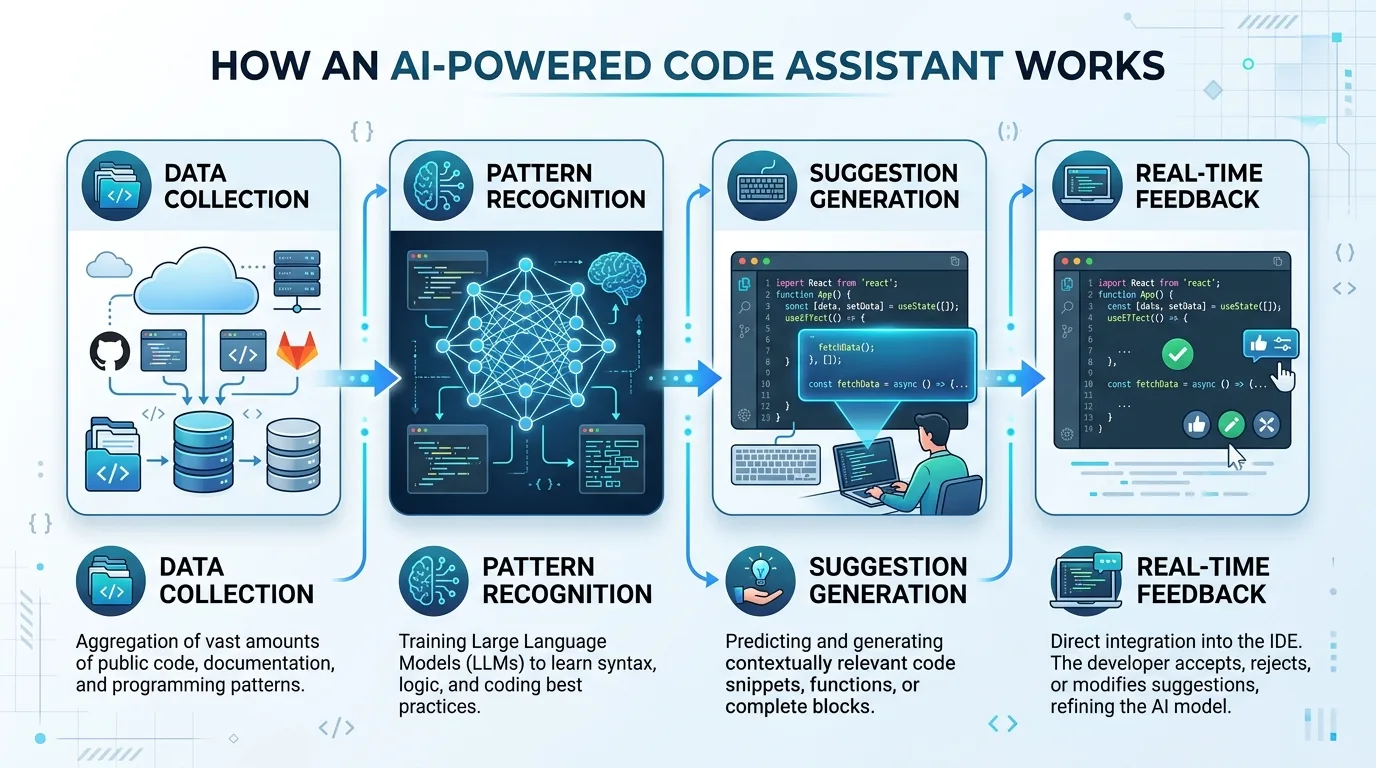
AI-powered code assistants, like GitHub Copilot, are tools that utilize machine learning algorithms to analyze code patterns and suggest improvements or completions. These tools aim to reduce the time spent on coding tasks by providing developers with real-time feedback and suggestions. By leveraging these AI-powered assistants, developers can focus on higher-level thinking and problem-solving, rather than getting bogged down in tedious coding details.
To understand how AI-powered code assistants work, let's break it down step-by-step:
1. Data Collection: GitHub Copilot collects data from a vast repository of open-source code to learn patterns and best practices.
2. Pattern Recognition: The tool analyzes the collected data to identify common coding patterns and syntax.
3. Suggestion Generation: Based on the recognized patterns, GitHub Copilot generates suggestions for improvements or completions.
4. Real-Time Feedback: The tool provides developers with real-time feedback and suggestions as they code.
By utilizing this process, AI-powered code assistants like GitHub Copilot aim to reduce the time spent on coding tasks by providing developers with a helping hand.
Benefits of Using GitHub Copilot

So, what are some of the benefits of using GitHub Copilot? Here are a few key advantages:
Increased Productivity: With GitHub Copilot, developers can write code up to 60% faster.
Improved Accuracy: AI-powered suggestions help reduce errors and bugs in the code.
Enhanced Collaboration: Developers can work together more efficiently, as the tool provides real-time feedback and suggestions.
Let's dive deeper into each of these benefits:
Increased Productivity
By leveraging GitHub Copilot, developers can automate routine coding tasks, such as writing boilerplate code or completing repetitive tasks. This allows them to focus on higher-level thinking and problem-solving, leading to increased productivity.
Improved Accuracy
AI-powered suggestions help reduce errors and bugs in the code by identifying potential issues early on. By incorporating these suggestions into their code, developers can ensure that their projects are of high quality and meet the required standards.
Enhanced Collaboration
GitHub Copilot provides real-time feedback and suggestions, allowing multiple developers to work together seamlessly. This feature is particularly useful for large-scale projects where collaboration is crucial.
Key Features of GitHub Copilot
Some of the key features of GitHub Copilot include:
Code Completion: The tool suggests completions for partially written code lines.
Code Review: GitHub Copilot provides instant feedback on code quality and suggest improvements.
Collaboration Tools: The platform offers real-time collaboration features, allowing multiple developers to work together seamlessly.
To illustrate how these features can be utilized in a real-world scenario:
Automated Testing: With GitHub Copilot, developers can automate testing processes, reducing the time spent on manual testing.
Code Optimization: The tool suggests optimizations to improve code efficiency and performance.
Error Detection: AI-powered suggestions help detect errors early in the development process.
Real-World Applications
Let's take a look at some real-world applications of GitHub Copilot. For instance:
Automated Testing: With GitHub Copilot, developers can automate testing processes, reducing the time spent on manual testing.
Code Optimization: The tool suggests optimizations to improve code efficiency and performance.
Error Detection: AI-powered suggestions help detect errors early in the development process.
To implement these features in your own workflow:
1. Integrate GitHub Copilot into Your IDE: Start by integrating GitHub Copilot into your Integrated Development Environment (IDE) of choice.
2. Configure the Tool: Configure the tool to work with your specific coding style and requirements.
3. Start Coding: Begin writing code, and GitHub Copilot will provide real-time feedback and suggestions.
Addressing Pain Points
We know that one of the biggest pain points for developers is difficulty in completing tasks efficiently. By leveraging GitHub Copilot, developers can:
Streamline Workflows: The tool helps reduce the time spent on coding tasks, allowing developers to focus on higher-level thinking.
Improve Accuracy: AI-powered suggestions help reduce errors and bugs in the code.
Enhance Collaboration: Developers can work together more efficiently, as the tool provides real-time feedback and suggestions.
To overcome these pain points:
1. Identify Bottlenecks: Identify areas where GitHub Copilot can make a significant impact on your workflow.
2. Configure the Tool: Configure the tool to address specific pain points and requirements.
3. Monitor Progress: Monitor progress and adjust settings as needed.
Evidence of Successful Implementation
Many companies have successfully implemented GitHub Copilot in their development workflows. For example:
Microsoft: Microsoft has integrated GitHub Copilot into its Visual Studio Code (VS Code) editor.
Google: Google has partnered with GitHub to offer AI-powered code completion features.
Other Organizations: Companies like Amazon, Facebook, and Twitter have also adopted GitHub Copilot in their development processes.
To implement GitHub Copilot in your own workflow:
1. Assess Your Requirements: Assess your specific requirements and identify areas where GitHub Copilot can make a significant impact.
2. Integrate the Tool: Integrate GitHub Copilot into your IDE of choice.
3. Configure Settings: Configure settings to work with your specific coding style and requirements.
By following these steps, you can successfully implement GitHub Copilot in your own workflow and experience the benefits for yourself.
Conclusion
GitHub Copilot is a powerful tool that can significantly impact developer productivity, accuracy, and collaboration. By leveraging its features and implementing it in your own workflow, you can overcome common pain points and achieve better results.
This Article was made with AI assistance and human editing.


