

Imagine spending hours designing a beautiful website, choosing the perfect domain name, and writing your first blog post—only to discover that no one can actually visit it. It’s a frustrating situation, but one that highlights a simple truth: every website needs a place to live on the internet. That place is called web hosting.
If you're building your first website, you've probably come across terms like web hosting, domain name, web server, and hosting provider. For beginners, these terms often sound technical and confusing. In reality, the concept is much simpler than it appears once you understand the basics.
Whether you're starting a personal blog, launching an online store, creating a portfolio, or building a website for your business, choosing the right website hosting is one of the first and most important decisions you'll make. Your hosting provider stores your website's files, keeps your site available around the clock, and plays a significant role in its speed, reliability, and overall user experience.
Your choice of hosting affects far more than simply getting your website online. It can influence page speed, security, uptime, search engine visibility, and even whether visitors stay on your site or leave after a few seconds. Starting with the right hosting makes it easier to grow your website as your audience expands.
Many people also confuse web hosting with a domain name. While they work together, they serve entirely different purposes. Understanding that difference can save you time, money, and unnecessary frustration when launching your website.
If you're still deciding on the perfect domain for your website, don't miss our guide on how a great domain name can make or break your online business. It explains why your domain is one of the most valuable long-term assets your brand will ever own.
In this beginner-friendly guide, you'll learn what web hosting is, why it's essential, how it supports your website behind the scenes, and what to consider before choosing a hosting plan. By the end, you'll have a clear understanding of the fundamentals—without needing a technical background.
What Is Web Hosting?
Web hosting is a service that stores your website's files on a web server and delivers them to visitors over the internet whenever they enter your domain name or click a link to your site.
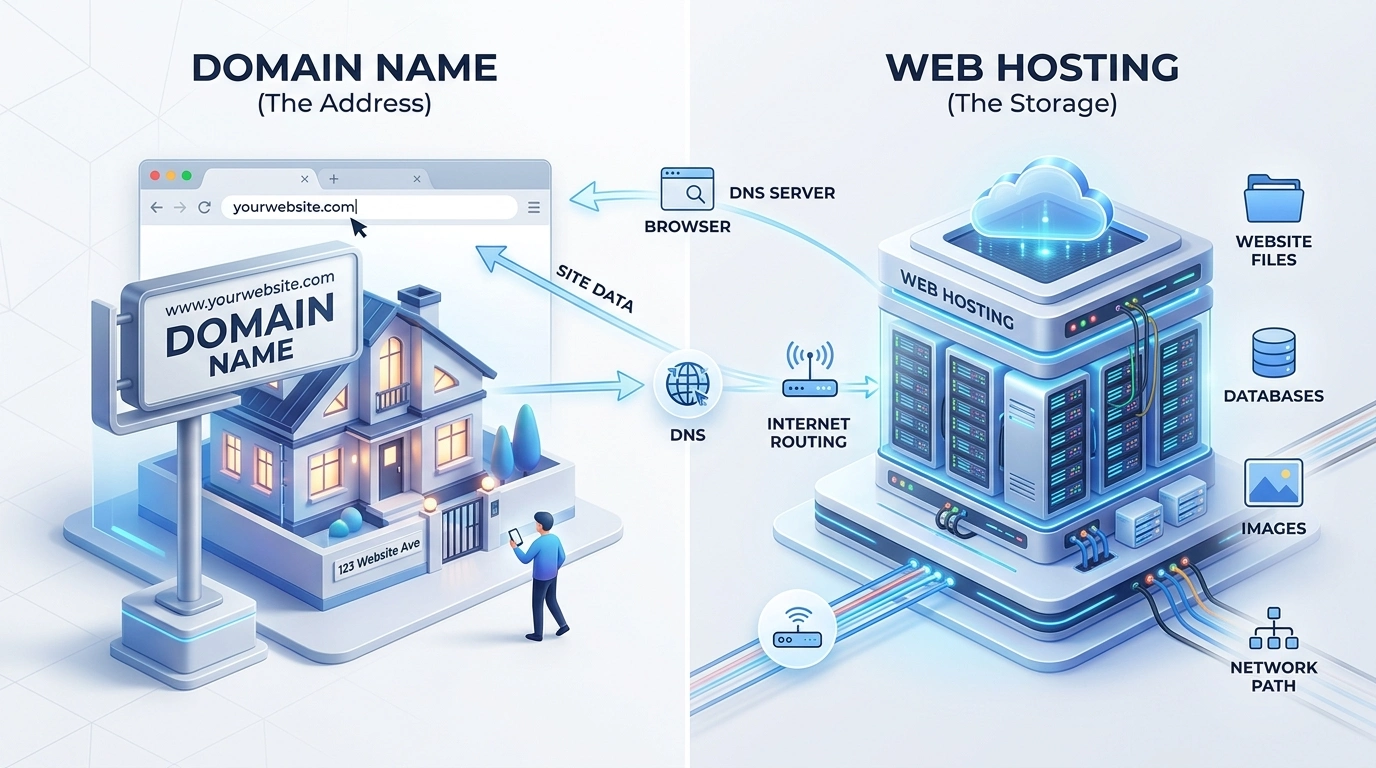
Think of your website as a house. Your domain name is the street address that tells visitors where to find it, while web hosting is the land and foundation that keep the house standing. Without hosting, your website's files have nowhere to be stored, so visitors can't access your site—even if they know the address.
When someone types your website address into their browser, the browser sends a request to the hosting server where your website is stored. The server then delivers the necessary files back to the visitor's device, allowing your website to appear within seconds. Although this process happens almost instantly, it's the foundation of how every website on the internet works.
For example, if you start a travel blog using WordPress, every article, photograph, comment, and contact form is stored on your hosting server. When someone searches for one of your articles and clicks the result, the hosting server retrieves those files and displays the page in their browser within moments.
Modern hosting providers do much more than simply store website files. Most hosting plans also include features designed to improve performance, security, and ease of use, such as:
Secure file storage to keep your website's content accessible.
High uptime so visitors can reach your website whenever they need it.
Free SSL certificates to encrypt data and build visitor trust.
Professional email hosting using your own domain name.
Automatic backups to restore your website if something goes wrong.
User-friendly control panels for managing your hosting without technical knowledge.
One-click installers that simplify setting up applications like WordPress.
The type of hosting you choose can influence your website's performance, scalability, and long-term growth. A personal blog has very different hosting needs than a busy ecommerce store or a high-traffic business website, which is why understanding your options is just as important as understanding what web hosting actually is.
Understanding what web hosting is is only the first step. To make informed decisions about choosing a hosting plan, it also helps to understand what happens behind the scenes each time someone visits your website. Let's explore that process next.
How Does Web Hosting Work?
Now that you understand what web hosting is, the next question is naturally: how does it actually work? While the technology behind web hosting is sophisticated, the process that happens when someone visits your website is surprisingly straightforward. Every time a visitor opens your website, a series of actions takes place in just a fraction of a second to deliver your content from a web server to their browser.
Understanding this process will help you make sense of terms like DNS, web server, and IP address, which you'll often encounter when managing a website.
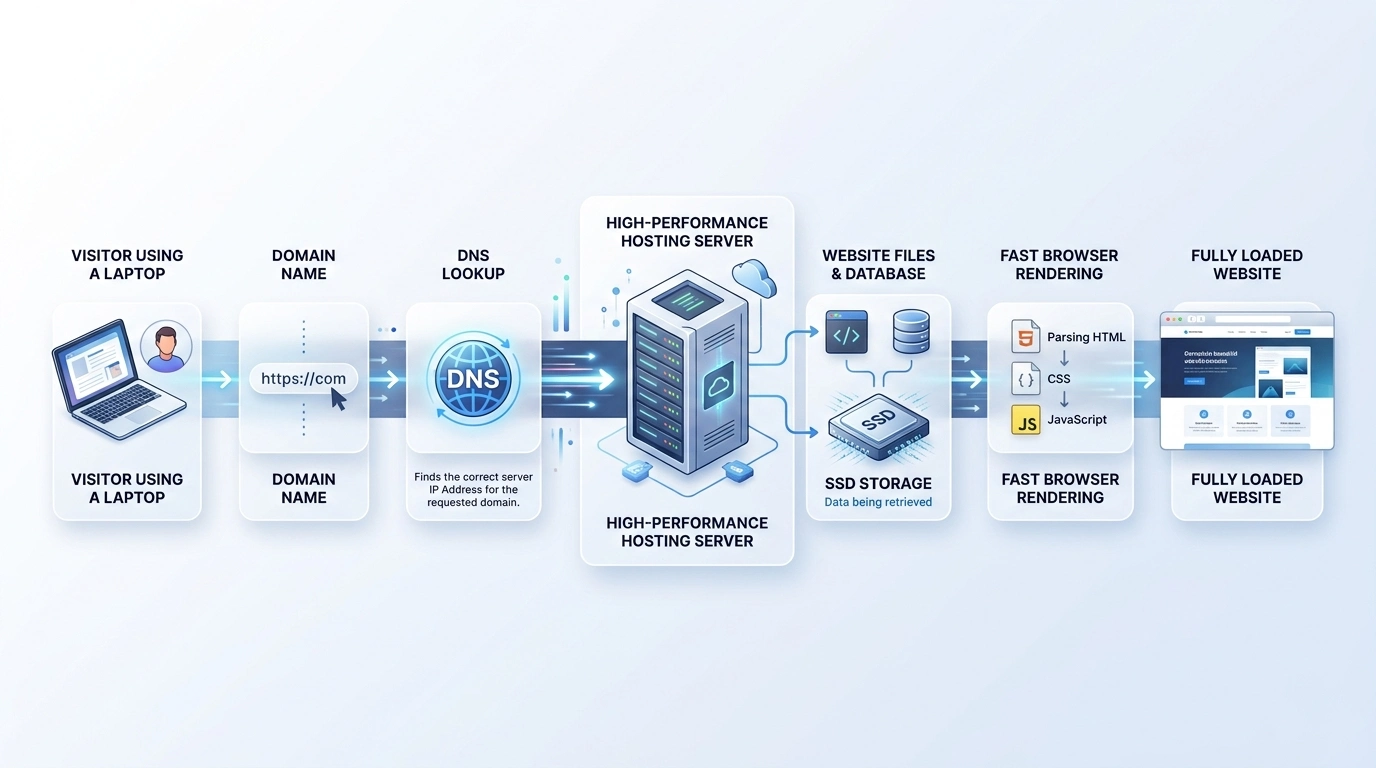
What Happens When Someone Visits Your Website?
Whenever a visitor enters your domain name into a web browser or clicks a link to your website, several systems work together behind the scenes to display the page correctly. Although it happens almost instantly, the journey can be broken down into a few simple steps.
The visitor enters your domain name.
For example, someone types yourwebsite.com into their browser or clicks a search result.DNS finds the correct server.
The Domain Name System (DNS) acts like the internet's directory. It translates your easy-to-remember domain name into the numerical IP address of the server where your website is hosted.The request reaches the hosting server.
After locating the correct server, the browser sends a request asking for the files needed to display the webpage.The server processes the request.
The hosting server retrieves the necessary files, such as HTML, CSS, JavaScript, images, and database content. If your website uses a content management system like WordPress, the server also generates dynamic content before sending it.The webpage appears in the browser.
The visitor's browser receives the files, assembles them, and displays the finished webpage—usually within a few seconds or less.
Every page on your website follows this same process, whether someone is reading a blog post, browsing your online store, or submitting a contact form.
Quick Summary
Visitor → Domain Name → DNS → Hosting Server → Website Files → Browser
What Is a Web Server?
A web server is a specialized computer designed to store website files and deliver them to visitors over the internet. Unlike a personal computer that you turn off at the end of the day, web servers operate continuously so your website remains available 24 hours a day, seven days a week.
Most reputable hosting providers keep their servers inside highly secure data centers. These facilities include backup power systems, high-speed internet connections, advanced cooling equipment, and multiple security measures to help ensure websites stay online even if hardware fails.
Depending on your hosting plan, your website may share server resources with other websites or have dedicated resources reserved specifically for your project. We'll explore these hosting types later in this guide.
What Files Does Your Hosting Store?
Your hosting account stores everything needed for your website to function properly. While visitors only see the finished pages, the server manages many different types of files behind the scenes.
HTML files that structure your webpages
CSS files that control design and layout
JavaScript files that add interactive features
Images, videos, and downloadable documents
Databases containing posts, comments, user accounts, and settings
WordPress core files, themes, and plugins (if you're using WordPress)
Email data if your hosting plan includes email hosting
For example, imagine you publish a new article on your blog and upload several high-quality photos. Those files are saved on your hosting server. When someone discovers your article through a search engine or a social media link, the server retrieves those files and sends them to the visitor's browser, allowing the page to load correctly.
Expert Tip:
The speed at which your server responds to requests can influence how quickly your pages load. Faster loading websites generally provide a better user experience and are more likely to keep visitors engaged.
Now that you've seen what happens behind the scenes every time someone visits a website, it's easier to understand why hosting is more than just storage. In the next section, we'll look at the practical reasons every website needs web hosting and the value it provides beyond simply keeping your files online.
Why Do You Need Web Hosting?
Understanding how web hosting works is one thing, but knowing why it matters is what helps you make smarter decisions when building a website. Whether you're creating a personal blog, launching an online store, or establishing an online presence for your business, web hosting provides the foundation that allows your website to function reliably every day.
Without a hosting service, your website wouldn't be consistently available to visitors. Beyond simply storing files, a quality hosting plan helps ensure your website loads quickly, remains secure, and can grow alongside your traffic and business goals.
It Makes Your Website Available Around the Clock
One of the most important roles of web hosting is keeping your website online 24 hours a day, 7 days a week. People can visit your site whenever it's convenient for them, whether that's during business hours, late at night, or from another country in a different time zone.
Reliable hosting providers invest in infrastructure designed to maximize uptime, which refers to the amount of time your website remains accessible. If your website is frequently unavailable, visitors may leave, potential customers could lose confidence, and search engines may have difficulty accessing your pages.
Expert Tip:
When comparing hosting providers, look for an uptime guarantee of at least 99.9%. While no provider can promise 100% uptime, a strong uptime record helps ensure your website remains consistently accessible.
It Helps Deliver a Better User Experience
Visitors expect websites to load quickly and respond smoothly. While many factors influence performance, your hosting environment plays a significant role in how efficiently your website serves content to users.
Good hosting can help reduce loading times, handle multiple visitors more effectively, and provide a more consistent browsing experience. This is especially important for websites that publish regular content, receive growing traffic, or rely on online sales and lead generation.
For example, imagine two online stores selling similar products. If one website loads almost instantly while the other takes several seconds to appear, many visitors are more likely to continue shopping on the faster website.
It Protects Your Website and Visitor Data
Security is another reason web hosting is essential. Every website connected to the internet faces potential threats, including malware, unauthorized access attempts, and automated attacks.
Many reputable hosting providers include security features that help reduce these risks, such as:
SSL certificates that encrypt data exchanged between your website and visitors.
Firewalls that help block suspicious traffic.
Malware scanning and removal tools.
Automatic backups that make it easier to recover your website if something goes wrong.
Regular server maintenance and software updates.
Although website owners still share responsibility for maintaining security, choosing a reliable hosting provider gives you a much stronger foundation than trying to manage everything yourself.
It Gives You Room to Grow
Your website's needs today may look very different a year from now. A personal blog might begin attracting thousands of monthly visitors, or a small business website could expand into a full ecommerce store.
As your audience grows, your hosting should be able to grow with it. Many providers allow you to upgrade your hosting plan without rebuilding your website, making it easier to add resources as your traffic, content, and business requirements increase.
Planning for future growth early can save time, reduce downtime, and help avoid unnecessary website migrations later.
It Includes Tools That Make Website Management Easier
Modern hosting plans often provide much more than server space. They typically include tools that simplify everyday website management, even for beginners with little technical experience.
Depending on your hosting provider, these tools may include:
One-click installation for content management systems like WordPress.
A visual control panel for managing files, databases, and email accounts.
Automatic software updates.
Website staging environments for testing changes safely.
Technical support when you need assistance.
These features reduce the amount of manual work required, allowing you to spend more time creating content, serving customers, or growing your business instead of managing server configurations.
Key Takeaway
Web hosting isn't just where your website lives—it's a service that helps keep your site online, secure, fast, and ready to grow. Choosing the right hosting provider can improve your visitors' experience today while giving your website the flexibility to scale in the future.
Now that you know why web hosting is essential, it's time to clear up one of the most common points of confusion for beginners: the difference between a domain name and web hosting.
Domain Name vs. Web Hosting: What's the Difference?
If there's one concept that confuses beginners more than anything else, it's the difference between a domain name and web hosting. They're often purchased together, managed from the same dashboard, and work closely behind the scenes—but they are not the same thing.
Understanding how these two services complement each other will help you avoid common mistakes when launching your first website and make it easier to choose the right products for your needs.
What Is a Domain Name?
A domain name is your website's unique address on the internet. It's the text people type into their browser to find your website, such as yourbusiness.com or yourblog.net.
Instead of asking visitors to remember a long string of numbers known as an IP address, a domain name provides a simple, memorable way to access your website. When someone enters your domain, the Domain Name System (DNS) helps direct their request to the correct hosting server.
Think of your domain name as your website's digital identity. It's what people share in emails, business cards, social media profiles, and search results.
How Web Hosting and a Domain Name Work Together
A domain name and web hosting perform different jobs, but neither can create a fully functional website on its own.
The domain helps visitors find your website, while the hosting service stores and delivers the content they want to see. When these two services are connected, visitors can access your website simply by entering your domain name.
For example, imagine you're opening a photography portfolio:
You register janesmithphotography.com as your domain name.
You purchase a hosting plan to store your portfolio, galleries, and contact page.
You connect the domain to your hosting account.
Anyone who visits your domain can now browse your website.
If either piece is missing, the experience breaks down. Without a domain name, visitors have no easy way to find your website. Without hosting, the domain points to a website that doesn't exist.
Domain vs. Web Hosting: Side-by-Side Comparison
Feature | Domain Name | Web Hosting |
|---|---|---|
Primary Purpose | Provides your website's online address. | Stores and serves your website's files. |
Example | yourwebsite.com | A hosting account on a web server. |
Required to Launch a Website | Yes | Yes |
Stores Website Content | No | Yes |
Can Be Purchased Separately | Yes | Yes |
Needs Periodic Renewal | Yes | Yes |
Can You Buy a Domain and Hosting from Different Companies?
Absolutely. There's no requirement to purchase both services from the same provider.
For example, you might register your domain name with one company while hosting your website with another. To make this work, you'll simply update your domain's nameservers or DNS settings so they point to your hosting provider.
Many beginners, however, choose to buy both services from the same company because it simplifies setup, billing, and ongoing management. Some hosting providers also include a free domain registration for the first year on eligible plans, making it a convenient option for first-time website owners.
Expert Tip:
When comparing hosting providers, look beyond introductory pricing. Check whether features like free SSL certificates, automatic backups, customer support, and domain renewal costs are included. A slightly higher upfront price can offer better long-term value if it reduces future expenses and simplifies website management.
Do You Need Both?
In most cases, yes. A public website typically requires both a domain name and web hosting.
There are a few exceptions, such as website builders that provide a temporary subdomain (for example, yourname.platform.com). While these options can be useful for testing or personal projects, using your own domain with reliable hosting offers a more professional appearance, greater flexibility, and full control over your online presence.
Quick Recap
A domain name is how people find your website.
Web hosting is where your website's files are stored.
You need both services for most live websites.
You can buy them from the same provider or from different companies.
Now that the difference between a domain name and web hosting is clear, the next step is choosing the right type of hosting for your website. Each hosting option offers different levels of performance, control, and scalability, making it important to match your hosting plan to your goals.
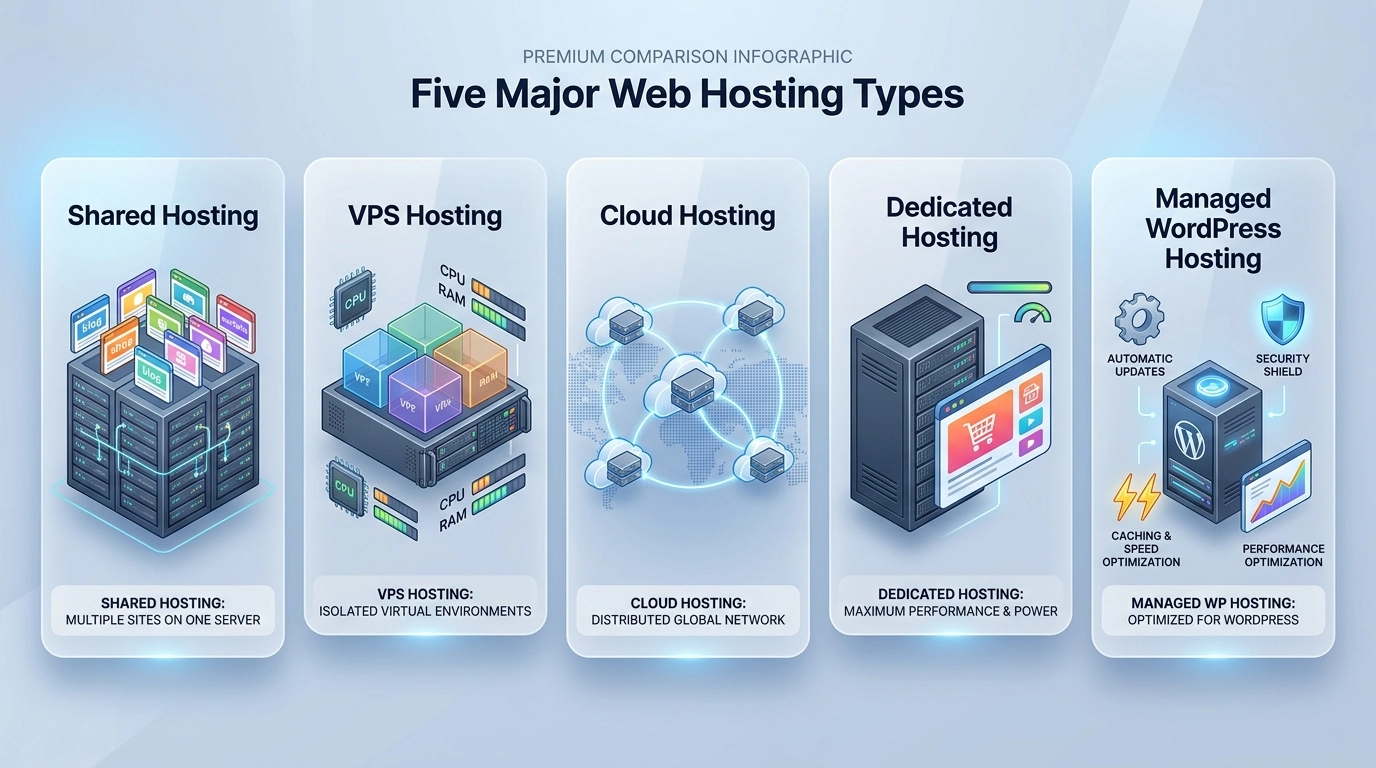
Types of Web Hosting Explained
Not all websites have the same hosting requirements. A personal blog with a few hundred monthly visitors doesn't need the same resources as a busy ecommerce store processing hundreds of orders every day.
That's why hosting providers offer different types of web hosting. Each option is designed for a specific level of traffic, performance, control, and budget. Understanding the differences will help you avoid paying for features you don't need—or choosing a plan you'll quickly outgrow.
Below are the most common types of web hosting and the situations where each one makes the most sense.
Shared Hosting
Shared hosting is the most affordable and beginner-friendly type of web hosting. As the name suggests, multiple websites share the resources of a single physical server, including its processor, memory, and storage.
Because the server's costs are divided among many customers, shared hosting offers an inexpensive way to launch a website without managing any technical infrastructure.
For most first-time website owners, shared hosting provides everything needed to get started, including sufficient resources for low to moderate traffic.
Best For
Personal blogs
Portfolio websites
Small business websites
Local service businesses
New affiliate websites
Advantages
Lowest starting cost
Simple setup with little technical knowledge required
Hosting provider manages server maintenance
Often includes free SSL certificates, email hosting, and one-click WordPress installation
Limitations
Resources are shared with other websites.
Performance may decrease during periods of unusually high traffic.
Limited customization compared to higher-tier hosting plans.
Who Should Choose Shared Hosting?
If you're launching your first website, shared hosting is usually the best place to begin. Many providers, including Namecheap Hosting, offer beginner-friendly shared hosting plans with features like free SSL certificates, easy control panels, and one-click WordPress installation, making it simple to get a website online without a large upfront investment.
Ready to launch your first website? Check out Namecheap's shared hosting plans to compare features, pricing, and choose a plan that fits your website's needs.
VPS Hosting
Virtual Private Server (VPS) hosting provides a balance between affordability and performance. Although multiple websites may still reside on the same physical server, virtualization technology allocates dedicated resources to each VPS.
This means your website receives its own guaranteed share of CPU, RAM, and storage, resulting in more predictable performance and greater control.
VPS hosting is often the next logical step for websites that have outgrown shared hosting but don't yet require an entire dedicated server.
Best For
Growing businesses
High-traffic blogs
Membership websites
Developers
Medium-sized ecommerce stores
Advantages
Dedicated resources
Improved performance
Greater customization
Better scalability
Limitations
Higher monthly cost than shared hosting
May require more technical knowledge depending on whether the VPS is managed or unmanaged
Cloud Hosting
Cloud hosting distributes your website across multiple interconnected servers instead of relying on a single machine. If one server experiences issues, another can continue serving your website, helping maintain availability.
This architecture makes cloud hosting an excellent choice for websites with fluctuating traffic or businesses expecting rapid growth.
Best For
Fast-growing businesses
SaaS platforms
Large ecommerce stores
Web applications
Websites with seasonal traffic spikes
Advantages
Excellent scalability
High availability
Flexible resource allocation
Strong reliability
Limitations
Pricing may vary based on resource usage
Configuration can be more complex than shared hosting
Dedicated Hosting
Dedicated hosting gives your website exclusive access to an entire physical server. Since no other customers share the server's resources, you have maximum performance, complete administrative control, and extensive customization options.
This level of hosting is generally reserved for organizations with demanding workloads or websites receiving very high levels of traffic.
Best For
Large enterprises
High-traffic websites
Resource-intensive applications
Organizations with strict security requirements
Advantages
Maximum performance
Complete server control
Highest level of customization
Excellent reliability
Limitations
Highest cost
Requires advanced server management knowledge or a managed service
Managed WordPress Hosting
Managed WordPress hosting is specifically optimized for WordPress websites. The hosting provider takes care of many technical tasks, allowing you to focus on creating content instead of maintaining your website.
Typical managed services include automatic WordPress updates, enhanced security, optimized performance, daily backups, and expert WordPress support.
Best For
Professional bloggers
Business websites
WooCommerce stores
Content creators
Users who want a hands-off hosting experience
Advantages
WordPress-specific optimization
Automatic maintenance
Enhanced security features
Specialized technical support
Limitations
Higher pricing than standard shared hosting
Designed primarily for WordPress websites
Quick Comparison of Hosting Types
Hosting Type | Cost | Performance | Scalability | Best For |
|---|---|---|---|---|
Shared Hosting | Low | Good | Limited | Beginners and small websites |
VPS Hosting | Medium | Very Good | High | Growing websites |
Cloud Hosting | Medium–High | Excellent | Excellent | Businesses with changing traffic |
Dedicated Hosting | High | Excellent | Very High | Large, resource-intensive websites |
Managed WordPress Hosting | Medium–High | Excellent | High | WordPress websites |
Key Takeaway
There's no single "best" type of web hosting. The right choice depends on your website's goals, expected traffic, technical expertise, and budget. Many website owners begin with shared hosting and upgrade as their needs evolve.
Now that you understand the different hosting options available, the next step is learning how to evaluate hosting plans and choose the one that best fits your website's current needs and future growth.
How to Choose the Right Web Hosting
With so many hosting plans available, choosing the right one can feel overwhelming. The good news is that you don't need the most expensive plan or the provider with the longest feature list. Instead, the best web hosting solution is the one that matches your website's current needs while giving you room to grow.
Before comparing prices, take a moment to think about the type of website you're building, how much traffic you expect, and which features you'll actually use. Focusing on these factors will help you avoid paying for resources you don't need—or choosing a plan that quickly becomes too limiting.
Start with Your Website's Purpose
The type of website you're creating should be the biggest factor in your decision. Different websites have different performance and resource requirements.
Website Type | Recommended Hosting | Why It Fits |
|---|---|---|
Personal Blog | Shared Hosting | Affordable and easy to manage. |
Portfolio Website | Shared Hosting | Ideal for low to moderate traffic. |
Small Business Website | Shared or Managed WordPress Hosting | Reliable performance with room for growth. |
WooCommerce Store | Managed WordPress or VPS Hosting | Better performance for online sales. |
Growing Business | VPS or Cloud Hosting | Handles increasing traffic more efficiently. |
Large Enterprise | Dedicated or Cloud Hosting | Provides maximum resources and flexibility. |
If you're launching your very first website, starting with a simpler hosting plan is often the most practical choice. As your website grows, most providers allow you to upgrade without rebuilding your site from scratch.
Evaluate the Features That Matter Most
Hosting plans often advertise dozens of features, but not all of them have the same impact on your website. Focus on the essentials that improve performance, security, and ease of management.
Feature | Why It's Important |
|---|---|
SSD Storage | Helps websites load faster than traditional hard drives. |
Free SSL Certificate | Encrypts visitor data and improves trust. |
Automatic Backups | Allows you to restore your website if something goes wrong. |
99.9% Uptime Guarantee | Reduces the likelihood of website downtime. |
One-Click WordPress Installation | Makes launching a website much easier. |
24/7 Customer Support | Provides help when technical issues arise. |
Scalable Plans | Lets your hosting grow with your website. |
Rather than choosing a plan with the longest feature list, prioritize the features that solve real problems for your website today while supporting future growth.
Think Beyond the Introductory Price
Low introductory prices can be appealing, but they're only part of the overall cost. Before purchasing a hosting plan, review what's included after the initial promotional period ends.
It's also worth checking whether essential features are included or offered as paid extras. For example, some providers bundle SSL certificates, email hosting, and automatic backups into their plans, while others charge separately for these services.
Expert Tip:
Always compare the renewal price, not just the first-year discount. A hosting plan with a slightly higher introductory cost may provide better long-term value if it includes features that would otherwise require additional purchases.
Choose a Hosting Provider with Reliable Support
Even if you never expect to contact customer support, having access to knowledgeable assistance can save hours of frustration when unexpected issues occur.
Look for hosting providers that offer multiple support channels, such as live chat, email, and knowledge bases with step-by-step tutorials. Fast, knowledgeable support is especially valuable if you're building your first website.
For example, if your website experiences downtime just before an important product launch or marketing campaign, responsive technical support can help you resolve the issue much more quickly.
Consider Future Growth
Your hosting requirements are likely to change as your website becomes more successful. A blog that starts with a few visitors each day may eventually receive thousands of monthly readers, while a local business website might expand into a full ecommerce store.
Choosing a provider that offers an easy upgrade path allows you to increase server resources without migrating to an entirely new platform.
Many established hosting companies—including Namecheap Hosting—offer multiple hosting tiers, making it possible to start with an affordable shared hosting plan and upgrade to VPS or cloud hosting as your website grows. This flexibility can reduce downtime and simplify long-term website management.
If you're looking for a beginner-friendly hosting provider with flexible upgrade options, explore Namecheap Hosting here. It offers affordable shared hosting, VPS, cloud hosting, free SSL certificates, and an easy-to-use control panel to help you launch and grow your website with confidence.
Hosting Buying Checklist
Choose a hosting type that matches your website's goals.
Look for SSD storage and a strong uptime guarantee.
Confirm that SSL certificates and backups are included.
Compare renewal pricing, not just introductory offers.
Review customer support options and reputation.
Select a provider that offers straightforward upgrades.
Choosing the right hosting plan is an important first step, but it's equally useful to understand how your hosting provider can influence your website's visibility in search engines. In the next section, we'll explore the relationship between web hosting and SEO.
Does Web Hosting Affect SEO?
One of the most common questions beginners ask is whether web hosting directly affects search engine rankings. The short answer is not directly—Google doesn't rank a website simply because it uses one hosting provider over another.
However, the quality of your hosting can have a significant impact on several technical factors that influence SEO. A reliable hosting environment helps improve website performance, availability, and security, all of which contribute to a better experience for both users and search engines.
Quick Answer
Web hosting is not a direct Google ranking factor, but it can indirectly influence SEO through page speed, uptime, website security, and overall user experience.

Website Speed and Page Experience
Fast-loading websites create a better experience for visitors. If your hosting server responds quickly and delivers content efficiently, your pages are more likely to load without unnecessary delays.
Website speed also plays a role in Google's Page Experience signals, which include metrics known as Core Web Vitals. While great hosting alone won't guarantee excellent scores, it provides the foundation for achieving strong performance.
Keep in mind that hosting is only one piece of the puzzle. Large image files, poorly optimized code, excessive plugins, and third-party scripts can also slow down a website, even when it's hosted on a powerful server.
Reliable Uptime Helps Search Engines Access Your Website
Search engines need to crawl your website regularly to discover new pages, update existing content, and understand changes to your site.
If your website experiences frequent downtime, search engine crawlers may occasionally be unable to access your pages. Although temporary outages usually aren't a problem, repeated or prolonged downtime can affect how efficiently your website is crawled and indexed.
Choosing a hosting provider with a strong uptime record helps ensure that both visitors and search engines can access your content whenever they need to.
Security Builds Trust
Website security is another area where hosting plays an important role. Modern hosting providers often include features such as SSL certificates, malware scanning, server-level firewalls, and automated backups that help protect your website.
Using HTTPS through an SSL certificate encrypts information exchanged between your website and its visitors. Besides improving user trust, HTTPS has long been recognized by Google as a lightweight ranking signal.
A secure website is also less likely to experience issues that could damage your reputation, such as malware infections or browser security warnings.
Server Location and Content Delivery
The physical location of your hosting server can influence how quickly visitors receive your website's content. Generally, data travels faster over shorter distances, so hosting your website closer to your primary audience may reduce loading times.
Many hosting providers also offer or integrate with a Content Delivery Network (CDN). A CDN stores copies of your website on multiple servers around the world, allowing visitors to receive content from the location nearest to them.
This can improve loading speeds for international audiences without requiring you to change your primary hosting plan.
Scalability Supports Long-Term SEO Growth
As your website attracts more visitors, it needs additional server resources to maintain consistent performance. If your hosting plan can't handle increased traffic, visitors may experience slow page loads or temporary outages during peak periods.
A hosting provider that offers simple upgrades makes it easier to scale your resources as your audience grows, helping your website continue delivering a positive user experience over time.
Hosting Is Only One Piece of SEO
Even the best hosting plan can't compensate for poor-quality content or ineffective SEO practices. Search rankings depend on many factors working together, including content quality, search intent, backlinks, internal linking, technical optimization, and user experience.
Think of hosting as the foundation of a house. A strong foundation creates stability, but the overall quality of the finished home depends on everything that's built on top of it.
Hosting Factor | Impact on SEO | Why It Matters |
|---|---|---|
Page Speed | High | Supports better user experience and Core Web Vitals. |
Uptime | High | Allows search engines and visitors to access your website consistently. |
SSL Certificate (HTTPS) | Moderate | Improves trust and supports secure browsing. |
Server Location | Moderate | May reduce loading times for nearby visitors. |
Scalability | Moderate | Helps maintain performance as traffic grows. |
Expert Tip:
If SEO is one of your long-term goals, choose a hosting provider that offers fast SSD storage, a reliable uptime guarantee, free SSL certificates, CDN integration, and straightforward upgrade options. These features create a solid technical foundation while you focus on publishing valuable content.
Now that you understand how hosting can influence your website's performance and search visibility, let's explore the key hosting features you'll encounter when comparing plans—and what each one actually means.
Common Web Hosting Features Explained
If you've compared a few hosting plans, you've probably noticed they include a long list of technical features. Terms like SSD storage, bandwidth, control panel, and CDN can seem overwhelming when you're new to web hosting.
The good news is that you don't need to become a server administrator to understand them. Knowing what these features do—and why they matter—will help you compare hosting plans more confidently and choose one that fits your website's needs.
SSD Storage
SSD (Solid State Drive) storage is where your website's files are stored. Compared to traditional hard disk drives (HDDs), SSDs can read and retrieve data much faster, which often results in quicker page loading times.
Today, SSD storage has become the standard for quality hosting plans and is suitable for virtually every type of website.
Bandwidth
Bandwidth refers to the amount of data your website can transfer to visitors over a given period. Every time someone loads a webpage, downloads a file, or views an image, data is transferred from your hosting server to their device.
Websites with many visitors or large media files generally require more bandwidth than smaller websites. Many hosting providers advertise "unmetered" bandwidth, which usually means you can use as much data transfer as your website reasonably requires within the provider's acceptable use policy.
Storage Space
Storage determines how much content you can keep in your hosting account. This includes webpages, images, videos, databases, emails, themes, plugins, and other website files.
Most new websites require relatively little storage, but websites with large image galleries, downloadable resources, or extensive video content may need significantly more.
SSL Certificate
An SSL (Secure Sockets Layer) certificate encrypts the information exchanged between your website and its visitors. When SSL is installed correctly, your website uses HTTPS instead of HTTP, helping protect sensitive information such as login credentials and contact form submissions.
Today, free SSL certificates are included with many hosting plans, making secure browsing accessible even for small websites.
Control Panel
A control panel provides a user-friendly interface for managing your hosting account. Instead of entering complex server commands, you can perform everyday tasks through a web-based dashboard.
Common tasks include:
Managing website files
Creating email accounts
Installing applications like WordPress
Managing databases
Viewing backups
Monitoring resource usage
Many hosting providers offer popular control panels such as cPanel or their own custom dashboards.
Automatic Backups
Backups create copies of your website so it can be restored if files are accidentally deleted, software updates fail, or unexpected technical problems occur.
Automatic backups reduce the risk of permanent data loss and are especially valuable for websites that are updated regularly.
Expert Tip:
Even if your hosting provider includes automatic backups, it's a good practice to keep an additional backup stored separately before making major changes to your website.
Content Delivery Network (CDN)
A Content Delivery Network (CDN) stores copies of your website's static files on servers located around the world. When someone visits your website, those files can be delivered from the server closest to their location.
This often improves loading times for visitors in different geographic regions while reducing the workload on your primary hosting server.
Email Hosting
Many hosting plans include the ability to create professional email addresses using your own domain name, such as info@yourbusiness.com or support@yourwebsite.com.
Using a branded email address can make your business appear more professional than relying on a free personal email account.
One-Click Installers
Installing website software manually can be complicated for beginners. One-click installers simplify the process by automatically setting up applications such as WordPress with only a few clicks.
This feature allows new website owners to focus on building their site instead of configuring databases and installation files manually.
Staging Environment
A staging environment is a private copy of your website where you can safely test updates, new plugins, design changes, or custom code before applying them to your live website.
This feature is especially useful for business websites and online stores where unexpected issues on the live site could affect visitors or sales.
24/7 Customer Support
Technical issues don't always happen during business hours. Access to knowledgeable customer support can make troubleshooting much easier, particularly if you're managing your first website.
Before choosing a hosting provider, check what support channels are available, such as live chat, email, phone support, or an online knowledge base.
Feature Comparison at a Glance
Hosting Feature | What It Does | Recommended for Beginners? |
|---|---|---|
SSD Storage | Stores website files with faster data access. | Yes |
SSL Certificate | Encrypts website traffic using HTTPS. | Yes |
Automatic Backups | Restores your website if problems occur. | Yes |
Control Panel | Simplifies website management. | Yes |
CDN | Improves loading speeds for global visitors. | Recommended |
Email Hosting | Creates professional email addresses. | Recommended |
One-Click Installer | Quickly installs website applications. | Yes |
Staging Environment | Tests changes before publishing them live. | Useful for growing websites |
Key Takeaway
Don't be distracted by long feature lists. Focus on the essentials first: SSD storage, free SSL, automatic backups, reliable uptime, an easy-to-use control panel, and responsive customer support. These features provide the strongest foundation for most new websites.
Understanding hosting features makes comparing plans much easier, but it's equally important to know which mistakes can lead to unnecessary costs or performance issues. In the next section, we'll look at the most common web hosting mistakes beginners make—and how to avoid them.
Common Web Hosting Mistakes to Avoid
Most hosting mistakes don't become obvious on the day you buy a plan they appear months later. Maybe your website starts slowing down as traffic grows, your renewal invoice is much higher than expected, or you discover that an important feature costs extra.
Fortunately, these problems are usually preventable. Knowing what to look for before you purchase hosting can save both money and frustration while giving your website a stronger foundation for future growth.
Choosing the Cheapest Hosting Without Comparing Features
It's tempting to choose the cheapest hosting plan available, especially when you're launching your first website. However, low prices often come with trade-offs that aren't immediately obvious.
For example, one hosting plan might cost only a few dollars less each month but exclude automatic backups or professional email. Purchasing those features separately could end up costing more than selecting a slightly better plan from the beginning.
Expert Tip:
Compare the total value of a hosting plan—not just its monthly price. Included features and reliable support can be worth far more than a small difference in cost.
Ignoring Renewal Pricing
Many hosting providers advertise attractive introductory discounts for new customers. While these offers can provide excellent value, the regular renewal price is often significantly higher.
Before checking out, look beyond the promotional price. Review the renewal rate, billing cycle, and any optional add-ons that will be charged after the introductory period. Understanding the full cost upfront makes it much easier to budget for your website over the long term.
Choosing the Wrong Hosting Type
Every hosting type is designed for different needs. Selecting a plan that doesn't match your website can lead to unnecessary expenses or performance limitations.
For example, purchasing a dedicated server for a simple personal blog is usually excessive, while running a busy online store on an entry-level shared hosting plan may eventually create performance bottlenecks as traffic increases.
Choose a hosting solution based on your website's current requirements while ensuring you have the option to upgrade as your audience grows.
Overlooking Customer Support Quality
Customer support often seems unimportant until you actually need it. If your website suddenly goes offline or you run into a configuration issue, quick access to knowledgeable support can make the difference between a short interruption and hours of downtime.
Instead of relying only on marketing claims, look for independent customer reviews that mention response times and the quality of technical assistance.
Skipping Regular Backups
Even if your hosting plan includes automatic backups, it's risky to assume every backup will always be available exactly when you need it.
Before installing major updates, changing themes, or making significant modifications to your website, create an additional backup. Having multiple recovery points provides extra protection if something goes wrong.
Ignoring Website Security
Many beginners assume their hosting provider handles every aspect of website security. In reality, security is a shared responsibility. While your hosting company protects the server, you're still responsible for keeping your website software updated, using strong passwords, and removing plugins or themes you no longer use.
Make security part of your regular website maintenance by keeping your software updated, enabling multi-factor authentication where available, and using strong, unique passwords for your hosting account and website administrator account.
Not Planning for Future Growth
Many websites start small but grow steadily over time. Choosing a hosting provider that offers easy upgrades allows you to add resources as traffic increases without moving your website to a completely different platform.
Planning ahead doesn't mean paying for more resources than you currently need—it simply means selecting a provider that can support your website as it evolves.
Believing Unlimited Means Truly Unlimited
Words like "unlimited" can be misleading if you don't read the details. In most cases, unlimited storage or bandwidth is intended for normal website usage and is still subject to acceptable use policies.
For the average blog or business website, these limits rarely become an issue. However, websites that store large video libraries or experience unusually heavy traffic should review the provider's terms before making a decision.
Not Reading What's Included in the Plan
Two hosting plans with similar prices can offer very different features. Before making a purchase, check exactly what's included.
Questions worth asking include:
Is a free SSL certificate included?
Are automatic backups part of the plan?
Does the plan include professional email hosting?
Is there a website migration service if I switch providers?
Are there any setup fees or additional charges?
Taking a few extra minutes to compare these details can prevent unexpected costs later.
Expert Insight
If you're unsure which hosting plan to choose, don't buy based on where you hope your website will be in three years. Buy a plan that comfortably supports today's needs and confirm that your provider offers straightforward upgrades when your traffic increases. Upgrading is usually much easier than migrating to an entirely different hosting company later.
Common Hosting Mistakes at a Glance
Mistake | Potential Impact | How to Avoid It |
|---|---|---|
Choosing based only on price | Missing important features | Compare overall value, not just cost. |
Ignoring renewal pricing | Unexpected future expenses | Review long-term pricing before purchasing. |
Selecting the wrong hosting type | Poor performance or unnecessary spending | Match the plan to your website's needs. |
Skipping backups | Possible data loss | Maintain multiple backup copies. |
Neglecting security | Higher risk of attacks | Use SSL, updates, and strong passwords. |
Not planning for growth | Difficult upgrades later | Choose a provider with scalable plans. |
Key Takeaway
The best hosting decisions are based on long-term value rather than short-term savings. By comparing features carefully, understanding pricing, prioritizing security, and choosing a provider that can grow with your website, you'll avoid many of the problems that commonly affect new website owners.
Now that you know what to avoid when choosing web hosting, let's look at a few real-world examples to see which hosting options make the most sense for different types of websites.
Real-World Examples: Which Type of Web Hosting Should You Choose?
Understanding hosting types is helpful, but real decisions are rarely made in theory. The hosting plan that's perfect for a travel blog may be completely unsuitable for an online store or a growing business.
To make choosing easier, let's look at a few common website scenarios and the hosting options that are typically the best fit for each one.
Example 1: Starting a Personal Blog
Scenario: Sarah has never built a website before. She wants to launch a travel blog where she'll publish one or two articles each week, upload photos from her trips, and gradually grow her audience through search engines.
Recommended Hosting: Shared Hosting
Why?
Affordable for beginners.
Easy to manage without technical expertise.
Provides enough resources for a new blog.
Can usually be upgraded later as traffic grows.
Expert Insight:
Many successful blogs begin on shared hosting. There's little benefit in paying for premium resources before your website actually needs them.
Example 2: Launching a Small Business Website
Scenario: A local plumbing company wants a professional website with service pages, customer testimonials, a contact form, and online appointment requests.
Recommended Hosting: Shared Hosting or Managed WordPress Hosting
Why?
Reliable performance for moderate traffic.
Easy website management.
Built-in security features.
Professional email hosting.
If the business plans to publish regular blog content or invest in local SEO, choosing a hosting provider that offers simple upgrades can make future growth easier.
Example 3: Running an Online Store
Scenario: An entrepreneur is launching an ecommerce store with hundreds of products, secure checkout, customer accounts, and frequent transactions.
Recommended Hosting: Managed WordPress Hosting (WooCommerce) or VPS Hosting
Why?
Better performance during busy shopping periods.
Dedicated resources for smoother checkout experiences.
Enhanced security for customer information.
Greater flexibility as the business expands.
Even short periods of downtime can affect sales and customer trust. Investing in reliable hosting from the beginning is often less expensive than losing orders because your website becomes slow or unavailable during busy shopping periods.
Example 4: Building a High-Traffic Content Website
Scenario: A digital publisher expects hundreds of thousands of monthly visitors and regularly publishes articles, videos, and downloadable resources.
Recommended Hosting: Cloud Hosting or Dedicated Hosting
Why?
Handles large traffic volumes more effectively.
Supports resource-intensive content.
Provides better scalability during traffic spikes.
Offers greater control over server resources.
For websites with unpredictable traffic, cloud hosting is often preferred because resources can be scaled more easily as demand changes.
Expert Insight
Many website owners assume they'll know exactly how much hosting they need before launching. In reality, it's often impossible to predict future traffic accurately. That's why flexibility matters more than choosing the "perfect" plan on day one. A provider with straightforward upgrades can save you from a complicated website migration later.
Example 5: Creating a Portfolio Website
Scenario: A freelance graphic designer wants to showcase completed projects, display client testimonials, and provide a contact form for potential clients.
Recommended Hosting: Shared Hosting
Why?
Low maintenance.
Cost-effective.
Sufficient for a relatively small website.
Easy to upgrade if new features are added later.
Even if traffic remains modest, choosing a reliable hosting provider ensures that potential clients can access the portfolio whenever they need it.
Not Sure Which Hosting Type Is Right for You?
Building your first website? → Choose Shared Hosting.
Running a WordPress website? → Consider Managed WordPress Hosting.
Your traffic is growing steadily? → Upgrade to VPS Hosting.
Traffic spikes throughout the year? → Choose Cloud Hosting.
Managing a large, high-traffic website or enterprise application? → Consider Dedicated Hosting.
Quick Hosting Recommendations
Website Type | Recommended Hosting | Main Reason |
|---|---|---|
Personal Blog | Shared Hosting | Affordable and beginner-friendly. |
Portfolio Website | Shared Hosting | Simple and cost-effective. |
Small Business Website | Shared or Managed WordPress Hosting | Reliable performance with easy management. |
Online Store | Managed WordPress or VPS Hosting | Supports ecommerce performance and security. |
Growing Startup | VPS or Cloud Hosting | Flexible resources for business growth. |
High-Traffic Website | Cloud or Dedicated Hosting | Handles large visitor volumes efficiently. |
Key Takeaway
The right hosting decision isn't about choosing the most powerful server—it's about matching your hosting resources to your website's current requirements. As your audience grows and your goals change, your hosting should be able to grow with you without creating unnecessary complexity.
Now that you've seen how hosting choices vary based on different website goals, let's walk through the basic steps involved in purchasing web hosting and getting your website online for the first time.

How to Get Started with Web Hosting
Buying web hosting is only the beginning. The next stage is connecting everything together so your website is accessible to visitors around the world. While that might sound technical, modern hosting providers have simplified the process so much that most beginners can complete the setup with just a few guided steps.
Whether you're creating a personal blog, business website, or online store, the setup process generally follows the same path.
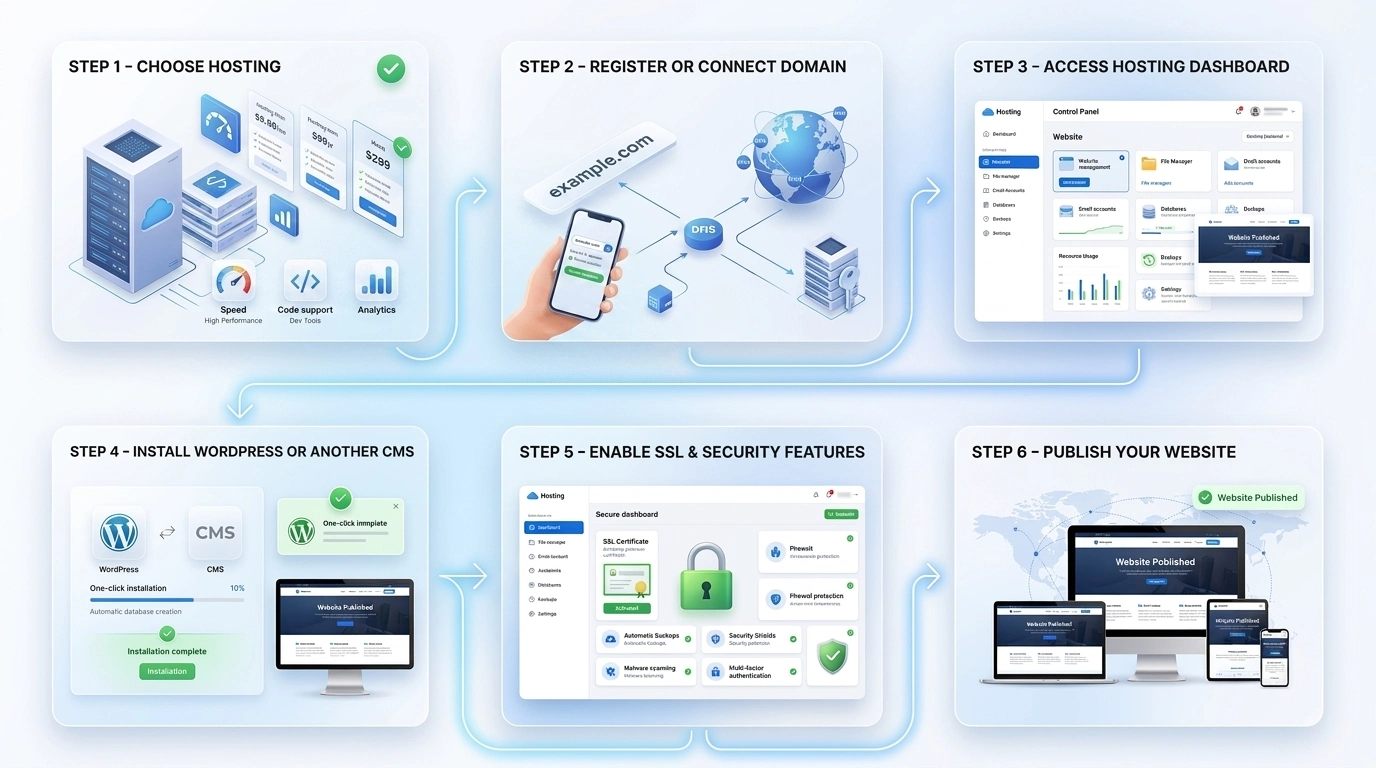
Step 1: Choose a Hosting Plan
Begin by selecting the hosting type that matches your website's goals. If you're creating your first blog, portfolio, or small business website, a shared hosting plan is usually enough. Websites expecting higher traffic or requiring more control may be better suited to VPS, cloud, or managed hosting.
Don't feel pressured to choose the biggest plan available. Most reputable hosting providers allow you to upgrade later if your website needs additional resources.
Step 2: Register or Connect Your Domain Name
Your website needs a domain name so visitors can find it online.
If you haven't registered one yet, you can usually purchase it during the hosting signup process. If you already own a domain from another registrar, you'll simply connect it to your hosting account by updating its nameservers or DNS settings, remember that DNS changes aren't always instant. It can take anywhere from a few minutes to up to 48 hours for the new settings to fully propagate across the internet, although many updates happen much sooner.
Expert Insight:
Before registering a domain, think long term. Choose a name that's easy to remember, simple to spell, and broad enough to support your future business or content—not just your first project.
Step 3: Set Up Your Hosting Account
After completing your purchase, your hosting provider will create your hosting account and provide access to its control panel or dashboard.
From there, you'll typically be able to:
Manage your website files.
Create professional email accounts.
Install applications like WordPress.
Configure backups and security settings.
Monitor your hosting resources.
Most providers also include onboarding guides that walk you through the initial setup.
Step 4: Install Your Website Platform
If you're building your website with a content management system (CMS) like WordPress, you'll usually find a one-click installer inside your hosting dashboard.
The installer automatically handles tasks such as creating a database and configuring the software, allowing you to focus on designing your website instead of dealing with technical setup.
If you're using another website builder or custom application, your hosting provider will typically provide installation instructions tailored to that platform.
Step 5: Secure Your Website
Before publishing your website, take a few minutes to enable the security features included with your hosting plan.
A basic security checklist includes:
Activate your SSL certificate.
Create strong, unique passwords.
Enable automatic backups.
Keep your CMS, themes, and plugins updated.
Enable multi-factor authentication if available.
Starting with good security habits is much easier than fixing security issues after your website goes live.
Step 6: Publish and Test Your Website
Once everything is configured, it's time to launch your website.
Before announcing your new website, spend a few minutes testing it as if you were a first-time visitor. Browse several pages, submit your contact form, click every menu link, and check how the site looks on both desktop and mobile devices. Catching small issues now is much easier than fixing them after visitors start arriving.
Testing these essentials helps ensure visitors have a smooth experience from day one.
Ready to put everything together? Follow our complete guide on how to start a website in 10 minutes to launch your website from start to finish.
Expert Insight
Don't rush to make your website public the moment it's installed. Spend time configuring backups, testing important pages, and reviewing basic security settings first. Launching a polished website creates a much better first impression than publishing as quickly as possible.
How the Setup Process Looks
Choose Hosting
↓
Register or Connect Domain
↓
Access Your Hosting Dashboard
↓
Install WordPress or Another CMS
↓
Enable SSL & Security Features
↓
Publish Your Website
Key Takeaway
Getting started with web hosting is much simpler than many beginners expect. By choosing the right hosting plan, connecting your domain, installing your website platform, and enabling basic security features, you'll have everything you need to publish your website with confidence.
With the setup process complete, let's answer some of the most common questions people have about web hosting before wrapping up this guide.
Conclusion: Choosing the Right Web Hosting Is Easier Than You Think
If you've made it this far, you've already learned more about web hosting than most people do before launching their first website. Now it's time to put that knowledge into action. Explore Namecheap Hosting to find a hosting plan that matches your website and get online with confidence. More importantly, you now understand that web hosting isn't just a technical requirement—it's the foundation that keeps your website accessible, secure, and ready for visitors.
While there are many hosting providers and plans available, the decision doesn't have to be overwhelming. Start by identifying what you want your website to achieve, then choose a hosting solution that matches your current needs rather than paying for resources you may never use.
Remember, your first hosting plan isn't a lifelong commitment. As your website grows, you can upgrade to more powerful hosting if your traffic, content, or business requirements change. The goal isn't to predict the future perfectly—it's to choose a provider that makes growth straightforward when the time comes.
Final Expert Insight
Many successful websites began with modest hosting plans and expanded only when there was a clear need. Focus on publishing valuable content and building your audience first. If your website outgrows its hosting, upgrading is usually much simpler than starting over.
If you're looking for a beginner-friendly hosting provider, it's worth comparing plans that include essentials like a free SSL certificate, automatic backups, one-click WordPress installation, and responsive customer support. Namecheap Hosting is one option that offers these features on many of its plans, making it a practical choice for personal websites, blogs, and small business sites.
Final Takeaway
Choosing web hosting isn't about finding the most expensive or feature-packed plan. It's about selecting a reliable foundation that fits your website today while giving you room to grow tomorrow. With the knowledge from this guide, you're well prepared to make an informed decision and launch your website with confidence.
Frequently Asked Questions About Web Hosting
Even after understanding the basics of web hosting, it's normal to have a few practical questions before choosing a hosting provider. Here are concise answers to some of the most common questions beginners ask.
Is web hosting necessary for every website?
If you want your website to be accessible on the internet through your own domain name, then yes—web hosting is usually required. Hosting stores your website's files and makes them available to visitors whenever they access your site.
Some website builders include hosting as part of their service, so you don't need to purchase it separately. However, hosting is still being used behind the scenes.
Can I create a website without buying web hosting?
Yes, but with limitations. Some platforms let you build and publish a website using a free subdomain, such as yourwebsite.platform.com. While this can be a good way to learn or test ideas, it often comes with restrictions on customization, storage, branding, or features.
If you want a professional website with your own domain name, purchasing web hosting is generally the better option.
What's the difference between a domain name and web hosting?
A domain name is your website's online address, while web hosting is the service that stores your website's files. Think of the domain as the street address and the hosting as the building where your website lives. You need both for most websites to be accessible online.
How much does web hosting usually cost?
Hosting prices vary depending on the type of hosting, included features, and billing period. Entry-level shared hosting plans are often the most affordable, while VPS, cloud, and dedicated hosting typically cost more because they provide additional resources and flexibility.
When comparing plans, look beyond the introductory price and review renewal costs and included features to understand the overall value.
Can I switch to a different hosting provider later?
Yes. Most websites can be migrated from one hosting provider to another. Many hosting companies even offer free or assisted website migration to make the process easier.
Planning your migration carefully helps minimize downtime and ensures your website continues running smoothly during the transition.
What happens if I don't renew my hosting plan?
If your hosting plan expires and isn't renewed, your website may become unavailable to visitors. After a grace period, some hosting providers may permanently remove your website files and databases.
To avoid accidental downtime or data loss, enable automatic renewal if you're comfortable doing so, or set reminders well before your renewal date.
Is free web hosting worth it?
Free hosting can be useful for learning, testing, or personal projects, but it usually comes with limitations such as limited storage, slower performance, fewer customization options, or mandatory advertising.
For a business website, online store, or long-term project, a paid hosting plan generally provides better reliability, security, and support.
How do I know when it's time to upgrade my hosting?
You may want to upgrade if your website regularly experiences slow loading times, receives more traffic than your current plan comfortably handles, or requires additional resources for new features.
Many hosting providers make it possible to upgrade without rebuilding your website from scratch.
Can I host more than one website on a single hosting plan?
It depends on the hosting plan. Some entry-level plans allow only one website, while others let you host multiple websites under the same account. Always check the plan details if you expect to manage more than one site.
Which type of web hosting is best for beginners?
For most first-time website owners, shared hosting is the best place to start because it's affordable, easy to manage, and provides enough resources for blogs, portfolios, and many small business websites.
If your website grows significantly, you can usually upgrade to a more powerful hosting solution without changing your domain name or rebuilding your site.
This Article was made with AI assistance and human editing.


