

Stop using free websites and upgrade to your own domain today that’s one of the smartest moves you can make if you're serious about growing online. Platforms like Blogger, Wix, and WordPress.com are great for beginners, but they come with hidden limitations that can slow your growth, limit monetization, and hurt your brand credibility.
If you’ve ever felt restricted by design, ads, or lack of control, you’re not alone. The good news? Moving to your own domain with reliable hosting is easier (and cheaper) than you think.
In fact, many creators and small business owners start by choosing to register a domain and pairing it with WordPress hosting to unlock full control and scalability.
Quick Answer: Free website platforms limit your growth through branding restrictions, forced ads, and limited control. Upgrading to your own domain with hosting allows full ownership, better SEO, and monetization opportunities. It’s the foundation of a serious online presence.
Let’s break this down properly.
Why free platforms hold you back
At first glance, free platforms seem perfect. No cost, quick setup, and beginner-friendly interfaces. But once you start growing, the cracks begin to show.
Limited branding: Your website URL looks like yourname.wixsite.com or blogname.blogspot.com
Forced ads: Platforms display their ads, not yours
Restricted customization: You can’t fully control design or functionality
SEO limitations: Harder to rank on Google
No real ownership: Your site can be suspended anytime
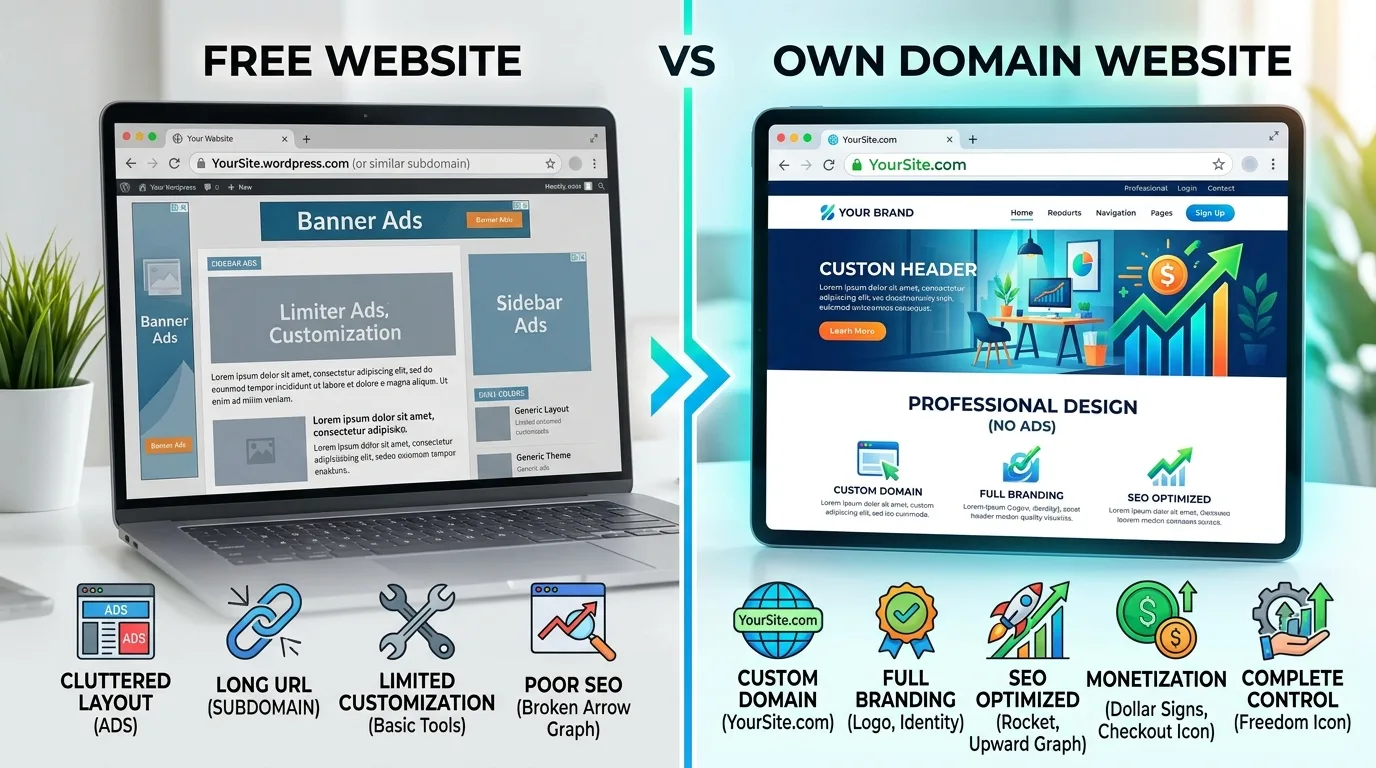
Imagine building a house on rented land you don’t truly own it. That’s exactly what happens with free websites.
What changes when you upgrade to your own domain
Switching to a self-hosted website transforms everything. You gain control, flexibility, and professional credibility.
Full ownership: Your site, your rules
Custom domain: yourbrand.com builds trust instantly
No forced ads: monetize your content your way
Advanced SEO: better rankings and traffic potential
Scalability: grow without platform restrictions
Most professionals choose to get affordable hosting and pair it with WordPress for maximum flexibility.
Free vs Self-Hosted Website Comparison
Feature | Free Platforms | Own Domain + Hosting |
Domain | Subdomain (e.g. yoursite.wix.com) | Custom domain (yoursite.com) |
Control | Limited | Full control |
Monetization | Restricted | Unlimited |
SEO | Weak | Strong potential |
Branding | Platform branding | Your own brand |
Why WordPress hosting is the best upgrade path
When upgrading, WordPress is the most popular choice—and for good reason. It powers over 40% of the web and gives you complete freedom.
With managed hosting, everything becomes simple: installation, updates, security, and performance are handled for you. Many beginners prefer to start with WordPress hosting because it removes technical complexity.
Step-by-step: How to upgrade from a free website
Here’s a simple roadmap to move from Blogger, Wix, or WordPress.com to your own domain.
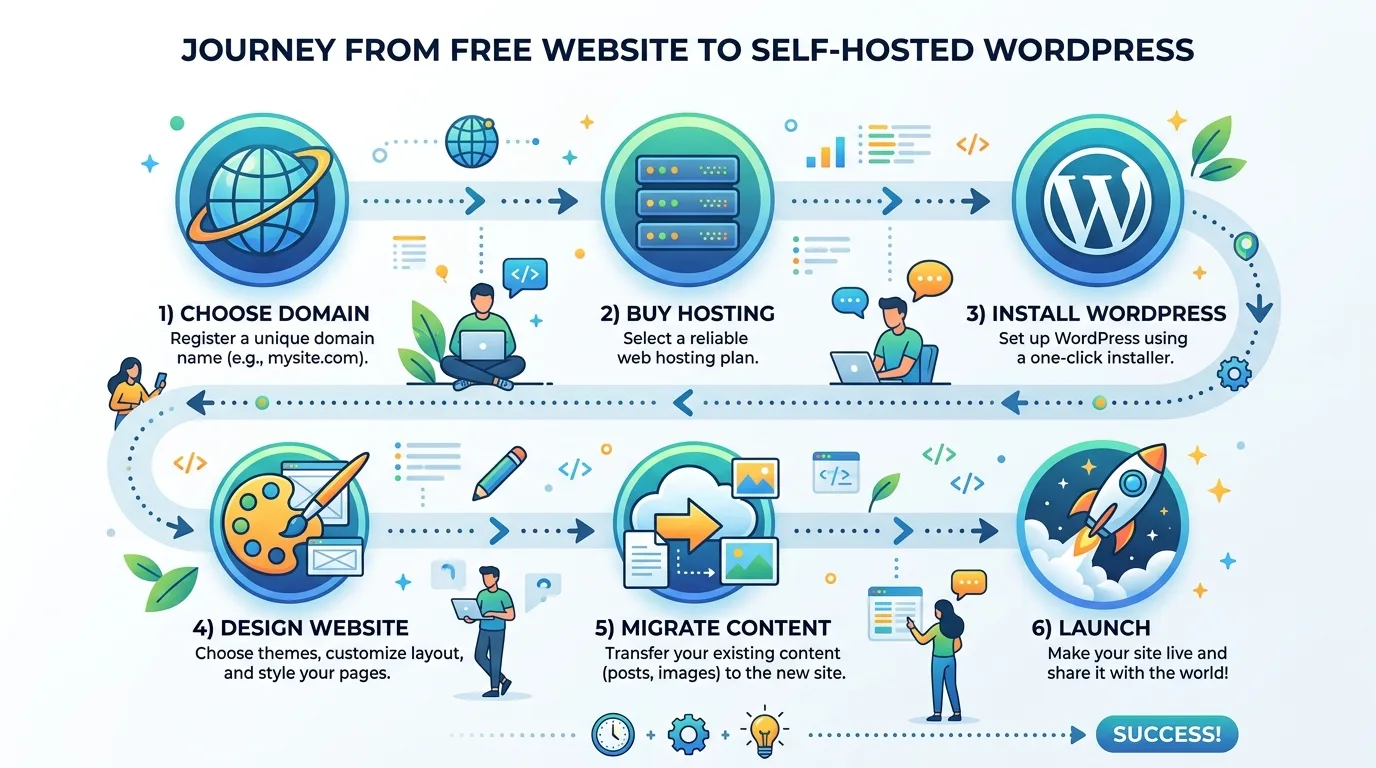
Choose a domain name
Pick something short, memorable, and brandable. You can get a cheap domain to start.Buy hosting
Select a reliable provider with good uptime and support.Install WordPress
Most hosting providers offer one-click installation.Design your website
Use themes and plugins to customize your site.Migrate your content
Move posts, pages, and images from your old platform.Set up SEO basics
Optimize titles, URLs, and meta descriptions.
Migration made easy (no technical skills needed)
If migration sounds complicated, don’t worry. You can use professional tools or services to handle everything for you. Many users prefer to migrate their WordPress site with guided support to avoid errors and downtime.
Real-world example
Let’s say you run a YouTube channel or blog. On a free platform, your site looks unprofessional and limits monetization. After switching to your own domain, you can:
Sell products or services
Run ads and affiliate links
Build an email list
Create a personal brand
This shift alone can turn a hobby into a real business.
Cost vs value: Is it worth it?
Many people hesitate because of cost—but the reality is surprising.
Domain: around $8–12/year
Hosting: a few dollars per month
For less than the cost of a coffee each week, you get a fully owned digital asset. That’s a high ROI investment.
If you're serious about growth, it makes sense to start with Namecheap and build something long-term.
Common mistakes to avoid
Choosing a complicated domain name
Ignoring SEO setup
Using too many plugins
Not backing up your site
Staying too long on free platforms
FAQ Section
1. Is it hard to move from Blogger or Wix to WordPress?
No, migration is straightforward with tools and guides available. You can also use professional migration services to simplify the process.
2. Do I need coding skills to manage my own website?
No, WordPress is beginner-friendly. You can manage everything using visual editors and plugins.
3. How long does it take to set up a website?
You can launch a basic site in under an hour. Customization may take longer depending on your needs.
4. Will I lose my content during migration?
No, if done correctly. Most tools allow safe transfer of posts, images, and pages.
5. Is free hosting ever worth it?
It’s fine for testing or learning, but not for serious growth or monetization.
6. Why is a custom domain important?
It improves credibility, branding, and SEO—making your site look professional and trustworthy.
7. What’s the best hosting for beginners?
Shared or WordPress hosting is ideal for beginners due to simplicity and affordability.
Conclusion
Free platforms are a great starting point—but they’re not built for long-term success. If you want to grow, monetize, and build a real brand, upgrading to your own domain is essential.
You don’t need to overthink it. Start simple, take control, and build something that actually belongs to you.
If you're ready to make the switch, you can launch your WordPress site today and finally move beyond the limits of free platforms.
This Article was made with AI assistance and human editing.


